
Silver 6.2 For Windows Info
After installation, launch Silver 6.2 from the Start Menu or desktop shortcut.
If you found a file or disc labeled "Silver 6.2 for Windows":
Note: If you are referring to "Silverlight 6.2," this does not exist; Microsoft Silverlight ended its lifecycle at version 5.
It's possible you're referring to one of the following:
Let’s break down the core functionalities that make this version stand out.
Silver 6.2 performs many temporary sort operations. Placing its temp folder on an NVMe drive reduces query times by up to 70%.
Silver 6.2 focuses on stability, performance, and developer extensibility while modernizing UI elements and improving file compatibility. Follow the upgrade and backup steps above to ensure a smooth transition.
If you meant a different "Silver 6.2" (e.g., a language library, synth plugin, or game), tell me which one and I’ll rewrite the article specifically for that product.
Related search suggestions provided.
There is no official "Silver 6.2" application for Windows. Based on community discussions and developer documentation, you are likely looking for Sliver 6.2, a tool used for bypassing activation locks on legacy iOS devices. Official Compatibility and Versions
MacOS-Only Support: The developer, Apple Tech 752, explicitly states that Sliver 6.2 is designed for macOS Mojave through Monterey.
No Windows Version: There is no official Windows release of Sliver 6.2. The official website only lists downloads for macOS. silver 6.2 for windows
Security Warnings: Community reports on Reddit suggest that any files labeled as "Sliver 6.2 for Windows" found online are often flagged as malicious or non-functional. Alternatives for Windows Users
If you need to bypass an activation lock or work with legacy iOS devices on a Windows machine, consider these alternative methods:
Arduino Method: For certain A5 devices (like iPhone 4S or iPad 2), Windows users often use an Arduino with a USB Host Shield to put the device into "pwned DFU mode" before using other software.
Legacy iOS Kit: The developer recommends Legacy iOS Kit as a more up-to-date tool, though it primarily runs on Linux or macOS.
Bootable Linux/Checkn1x: Many Windows users create a bootable USB drive with a Linux-based environment (like Checkn1x) to run tools that are otherwise unavailable on Windows. Note on "Proper Text"
If "proper text" refers to a specific command or script, ensure you are not attempting to run macOS-specific Terminal commands (like chmod or Homebrew) in the Windows Command Prompt, as they will not work.
"Silver 6.2" for Windows primarily refers to a popular iOS bypass tool, though it is famously a macOS-native application . Official versions beyond Sliver 5.4
are typically built for macOS to support specific exploits like
If you are looking for this software, here is the current consensus from community discussions on Reddit's r/setupapp Software Identification iOS Bypass (Sliver): Created by Apple Tech 752, Sliver 6.2
is a tool used for iCloud activation lock bypasses on legacy Apple devices. Platform Compatibility:
While a "Silver Windows" version existed (based on version 5), the official 6.2 update was designed for macOS (High Sierra to Monterey). Security Risks: After installation, launch Silver 6
Many "Silver 6.2 for Windows" downloads found on third-party sites or YouTube descriptions are reported by users as
or phishing scams. Windows Defender often flags these files as viruses. Alternatives for Windows Users
If you need similar functionality on a Windows PC, users often recommend the following instead: Legacy iOS Kit:
A script-based tool that supports various restores and downgrades on Linux and macOS, often preferred for its reliability. Nattramnramdisk: Cited as a reliable alternative for ramdisk-based tasks. Palera1n/Checkra1n:
Standard jailbreak tools that can be run on Windows via a bootable USB (like The developer's original site ( AppleTech752
) has faced periodic issues with hosting and indexing. It is highly recommended to verify any download through community-trusted links on to avoid infecting your PC. Are you trying to bypass a specific device , or are you looking for a different "Silver" software (like photography presets)?
Unlocking the Power of Silver 6.2 for Windows: A Comprehensive Guide
In the realm of software development, innovation and efficiency are paramount. One tool that has been making waves in the industry is Silver 6.2 for Windows. This powerful software has been designed to streamline processes, enhance productivity, and provide users with a robust platform for their needs. In this article, we will delve into the world of Silver 6.2 for Windows, exploring its features, benefits, and applications.
What is Silver 6.2 for Windows?
Silver 6.2 for Windows is a cutting-edge software solution developed for the Windows operating system. It is designed to provide users with a comprehensive platform for various tasks, including data management, analysis, and visualization. The software boasts an impressive array of features, making it an ideal choice for professionals and individuals seeking to optimize their workflow.
Key Features of Silver 6.2 for Windows
So, what sets Silver 6.2 for Windows apart from other software solutions? Here are some of its key features:
Benefits of Using Silver 6.2 for Windows
The benefits of using Silver 6.2 for Windows are numerous. Here are some of the most significant advantages:
Applications of Silver 6.2 for Windows
Silver 6.2 for Windows has a wide range of applications across various industries. Here are some examples:
System Requirements for Silver 6.2 for Windows
To ensure smooth operation, Silver 6.2 for Windows requires the following system specifications:
Conclusion
Silver 6.2 for Windows is a powerful software solution that offers users a comprehensive platform for data management, analysis, and visualization. With its intuitive interface, advanced analytics tools, and robust security features, the software is an ideal choice for professionals and individuals seeking to optimize their workflow. Whether you're a business analyst, data scientist, or researcher, Silver 6.2 for Windows is a valuable tool that can help you unlock the full potential of your data.
Getting Started with Silver 6.2 for Windows
If you're interested in trying out Silver 6.2 for Windows, here are the steps to get started: Note: If you are referring to "Silverlight 6
By following these steps, you can unlock the power of Silver 6.2 for Windows and start optimizing your workflow today.
 Qadın Günəş eynəkləri
  Uşaq Günəş eynəkləri
  Kişi Günəş eynəkləri
  Brend Qadın Günəş eynəkləri
  Brend Kişi günəş eynəkləri
  Kişi optik eynəyi
  Qadın optik eynəyi
  Uşaq optik eynəyi
  yeniyetmə optik eynək
  Böyük
Böyük  Uşaq
Uşaq  Şəffaf linza
  Rəngli linza
  Rəngli optik linza
  Linza suyu
  Linza qabı
  Aksesuarlar
  asağı qiymətə
  toric (Astiqmat) linza
  multifocal linzalar
  GUNLUK KULLAN-AT LENSLER
  Zəifləməni dayandiran/kontrol edən susələr
 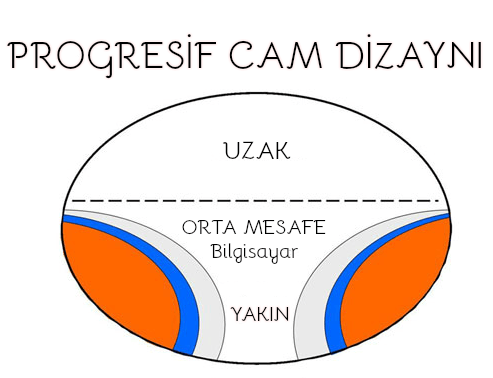 PROGRESIF (uzag orta yaxin) suseler
 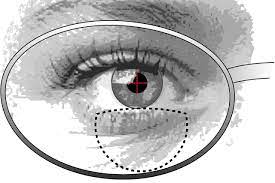 BIFOKAL süsələr (uzag yaxin)
  BRENDƏ GÖRƏ SEC (organik)